

Overview
The Share A Refund Paper Invoice Preference API lets you manage billing delivery settings for users and websites. You can develop applications that integrate with Share A Refund to programmatically opt accounts in or out of physical mailings, ensuring that billing preferences align with organizational sustainability goals or accounts payable workflows.
The following figure shows the relationship between your Share A Refund app, the Share A Refund API, and Paper Invoice Preferences.
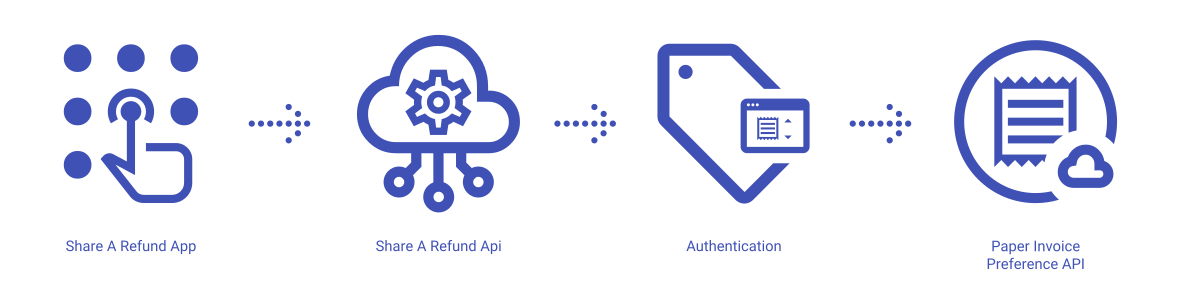
Share A Refund App
Share A Refund’s preference services give users control over how they receive financial documents, allowing them to toggle between digital-only delivery and traditional paper statements based on their administrative needs.
Share A Refund API
The REST API that allows users to retrieve current settings and update invoice delivery methods for specific users or websites from within your app.
Preference Management
A system that stores and enforces the delivery flags (enabled/disabled), ensuring that the billing engine generates and mails physical copies only to those entities that have explicitly requested them.
What can users do with the Share A Refund Paper Invoice Preference API?
Users can use the Share A Refund Paper Invoice Preference API to perform common workflows, such as:
- Retrieve the current paper invoice setting for a specific user ID
- Check if a specific website profile is configured for physical mail
- Programmatically disable paper invoices to support “Go Green” initiatives
- Enable paper billing for accounts requiring physical audit trails
- Synchronize billing preferences between internal systems and Share A Refund
Paper Invoice Preference properties available to view and modify through the Share A Refund Paper Invoice Preference API:
- Paper Invoices Enabled (Boolean)
- User IDs
- Website IDs
Additional info
Learn more about developing with Share A Refund Paper Invoice Preference API, including handling authentication, authorization, reference the Develop on Share A Refund API for your workspace. More →
Learn more about how to launch and run a Share A Refund Paper Invoice Preference API app, read the Developer Getting Started Guide. More →