

Overview
The Share A Refund Auth API lets you manage authentication and authorization for your workspace. You can develop applications that securely integrate with Share A Refund, ensuring that access to sensitive billing, shipping, and agreement data is protected through industry-standard security protocols.
The following figure shows the relationship between your Share A Refund app, the Share A Refund API, and Authentication.
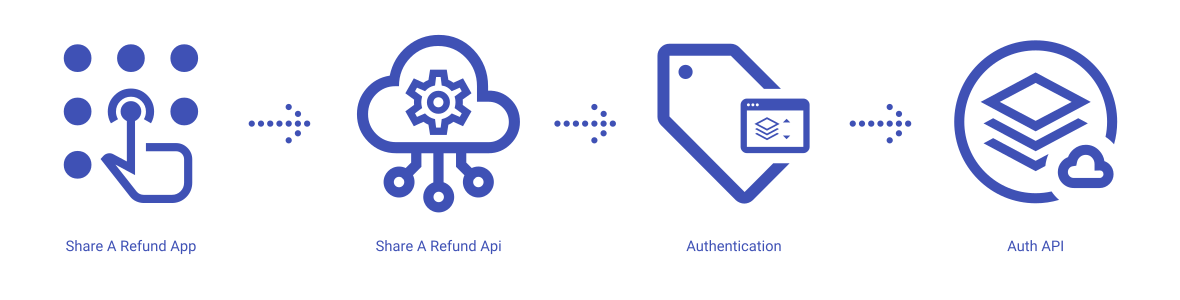
Share A Refund App
Share A Refund’s authentication services give users the ability to manage API keys, secret credentials, and OAuth tokens, providing granular control over who accesses your data and how.
Share A Refund API
The REST API that allows users to request, refresh, and revoke access tokens from within your app.
Identity Verification
An app that uses Share A Refund Auth as the gatekeeper in order to validate the identity of every request to ensure it originates from a verified source.
Token Management
A system that maintains the lifecycle of all bearer tokens and API keys, handling expiration logic and scope enforcement inherent to individual integration sessions.
What can users do with the Share A Refund Auth API?
Users can use the Share A Refund Auth API to perform common workflows, such as:
- Generate a new access token using client credentials
- Refresh an expired OAuth token
- Revoke an active token to terminate a session immediately
- Validate the scope and permissions of a specific API key
- Integrate secure “Sign in with Share A Refund” flows
- Rotate client secrets for enhanced security
Authentication properties available to create, modify, update and delete through the Share A Refund Auth API:
- Access Tokens
- API Keys
- Client Credentials
- OAuth Scopes
- Refresh Tokens
Additional info
Learn more about developing with Share A Refund Auth API, including handling authentication, authorization, reference the Develop on Share A Refund API for your workspace.
More →
Learn more about how to launch and run a Share A Refund Auth API app, read the Developer Getting Started Guide.
More →