

Overview
The Share A Refund Email API lets you manage automated notifications and reporting distributions. You can develop applications that integrate with Share A Refund to customize communication workflows, keeping stakeholders informed about shipping exceptions, audit results, and payment confirmations.
The following figure shows the relationship between your Share A Refund app, the Share A Refund API, and Email services.
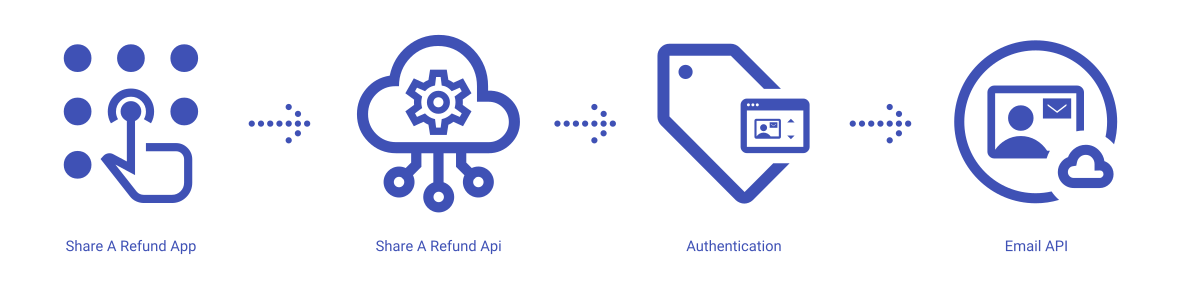
Share A Refund App
Share A Refund’s email services give users the ability to configure alerts and schedule reports, ensuring the right team members receive critical shipping intelligence at the right time.
Share A Refund API
The REST API that allows users to trigger transactional emails, manage recipient lists, and retrieve delivery logs from within your app.
Notification Management
A system that orchestrates the delivery of time-sensitive alerts, such as late deliveries or lost packages, enabling proactive customer service.
Template Engine
A mechanism that maintains standardized email layouts and content, ensuring consistency across all automated communications sent from the platform.
What can users do with the Share A Refund Email API?
Users can use the Share A Refund Email API to perform common workflows, such as:
- Send transactional emails for specific shipment events
- Manage subscriber lists for weekly or monthly reports
- Retrieve status logs to verify email delivery and open rates
- Update email preferences for different user roles
- Configure alerts for specific audit thresholds
- Test email templates before deployment
Email properties available to create, modify, update and delete through the Share A Refund Email API:
- Delivery Logs
- Notifications
- Preferences
- Recipient Lists
- Templates
Additional info
Learn more about developing with Share A Refund Email API, including handling authentication, authorization, reference the Develop on Share A Refund API for your workspace.
More →
Learn more about how to launch and run a Share A Refund Email API app, read the Developer Getting Started Guide. More →