

Overview
The Share A Refund Job API lets you manage background tasks and asynchronous operations. You can develop applications that integrate with Share A Refund to execute bulk processes, track progress status, and retrieve results upon completion without blocking main application threads.
The following figure shows the relationship between your Share A Refund app, the Share A Refund API, and Job services.
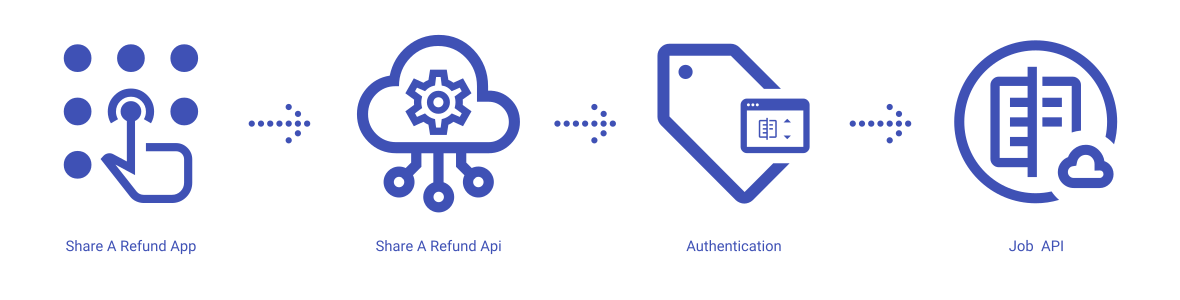
Share A Refund App
Share A Refund’s job services give users the power to handle large datasets efficiently to ensure that long-running operations execute reliably in the background while the user interface remains responsive.
Share A Refund API
The REST API that allows users to submit new tasks, check status updates, and download output files from within your app.
Task Queue
A system that organizes pending operations to ensure execution follows a priority order based on submission time and resource availability.
Status Tracking
A mechanism that reports the current state of a process and provides percentage completion data or specific error details for failed attempts.
What can users do with the Share A Refund Job API?
Users can use the Share A Refund Job API to perform common workflows, such as:
- Submit a request for a bulk data export
- Check the status of an active job
- Cancel a task that is no longer needed
- Retrieve the download URL for a completed report
- View a history of past operations
- Identify errors in failed batch processes
Job properties available to create, view, and manage through the Share A Refund Job API:
- Completion Status
- Error Logs
- Job IDs
- Output Files
- Progress Metrics
Additional info
Learn more about developing with Share A Refund Job API, including authentication and authorization protocols, in the Develop on Share A Refund API reference for your workspace. More →
Learn more about how to launch and run a Share A Refund Job API app, read the Developer Getting Started Guide.
More →