

Overview
The Share A Refund SFTP API lets you manage secure file transfer configurations and credentials. You can develop applications that integrate with Share A Refund to automate the exchange of large datasets, ensuring that reports and shipping data are securely delivered to external servers for processing.
The following figure shows the relationship between your Share A Refund app, the Share A Refund API, and SFTP services.
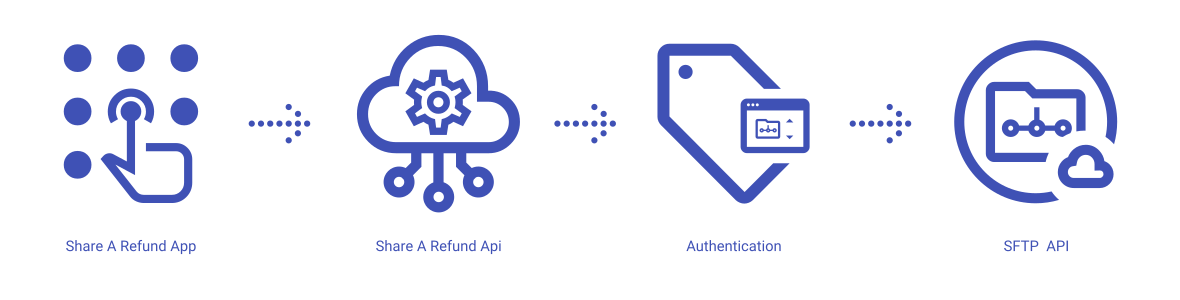
Share A Refund App
Share A Refund’s SFTP services give users the ability to define secure endpoints for data dumps, allowing for the automated push and pull of files between the platform and internal enterprise systems.
Share A Refund API
The REST API that allows users to create, update, and validate SFTP connection profiles from within your app.
Credential Management
A system that securely stores authentication details, such as login credentials and SSH keys to ensure that automated connections remain authenticated without exposing sensitive secrets.
Connection Testing
A mechanism that validates connectivity to the specified host and checks for firewall issues or credential errors before the activation of a transfer automation.
What can users do with the Share A Refund SFTP API?
Users can use the Share A Refund SFTP API to perform common workflows, such as:
- Create a new SFTP connection profile
- Update credentials for an existing server
- Test connectivity to a remote host
- Define specific directory paths for file uploads
- List all configured SFTP destinations
- Delete obsolete connection profiles
SFTP properties available to create, modify, update and delete through the Share A Refund SFTP API:
- Connection Status
- Credentials
- Host Details
- Port Configurations
- Remote Paths
Additional info
Learn more about developing with Share A Refund SFTP API, including handling authentication, authorization, reference the Develop on Share A Refund API for your workspace.
More →
Learn more about how to launch and run a Share A Refund SFTP API app, read the Developer Getting Started Guide. More →