

Overview
The Share A Refund Test API lets you validate API integration workflows and experiment with core data operations. You can develop applications that integrate with Share A Refund to safely simulate CRUD (Create, Read, Update, Delete) actions, test authentication protocols, and verify response formats without affecting production data.
The following figure shows the relationship between your Share A Refund app, the Share A Refund API, and Test services.
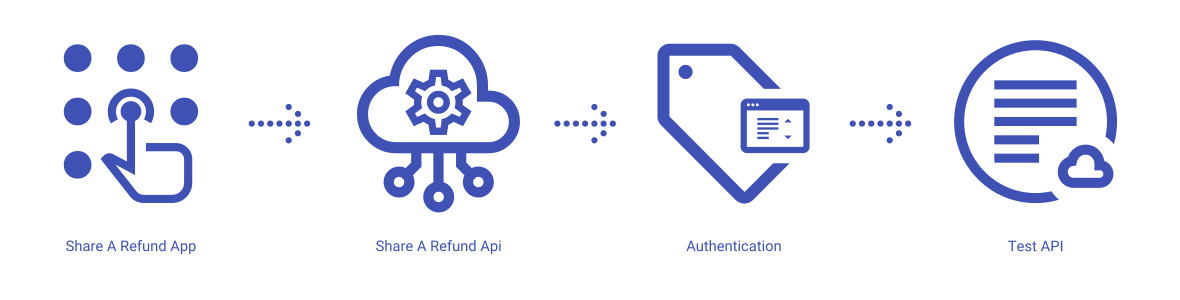
Share A Refund App
Share A Refund’s test services give developers a sandbox environment to experiment with API calls, ensuring that error handling, pagination logic, and data parsing are correctly implemented before deploying to production.
Share A Refund API
The REST API that allows users to create mock items, trigger validation errors, and simulate authentication flows from within your app.
Integration Verification
A system that provides predictable responses for standard HTTP methods (GET, POST, PUT, DELETE), allowing developers to confirm that their application correctly handles success states, validation failures, and authorization challenges.
What can users do with the Share A Refund Test API?
Users can use the Share A Refund Test API to perform common workflows, such as:
- Create dummy items to verify JSON body structure
- Retrieve lists of test objects to validate pagination and filtering logic
- Simulate login attempts to test authentication token retrieval
- Update existing records to check data persistence and modification timestamps
- Delete test items to verify resource cleanup procedures
- Trigger specific error codes (400, 401, 404, 409) to test exception handling
Test properties available to create, modify, update and delete through the Share A Refund Test API:
- Item Status
- Metadata Objects
- Priority Levels
- Tags
- Test Items
Additional info
Learn more about developing with Share A Refund Test API, including handling authentication, authorization, reference the Develop on Share A Refund API for your workspace.
More →
Learn more about how to launch and run a Share A Refund Test API app, read the Developer Getting Started Guide.
More →